smgl 0.11.0
Structured Metadata Engine and Graph Objects Library
Loading...
Searching...
No Matches
smgl

smgl is a C++14 library for creating custom dataflow pipelines that are instrumented for serialization. It was designed to make it easy to convert existing processing workflows into repeatable and observable pipelines for the purposes of experimental reporting, reliability, and validation.

View the latest source code on GitHub.

Requirements

  • CMake 3.24+
  • C++14 compiler (clang, gcc, etc.)
  • JSON for Modern C++ 3.9.1+
  • (optional) Boost.Filesystem 1.58+
    • This project will automatically check if the compiler provides std::filesystem. If it is not found, then Boost.Filesystem is required. This behavior can be controlled with the SMGL_USE_BOOSTFS CMake flag.

Build and Installation

CMake

This project is built and installed using the CMake build system:

mkdir build
cd build/
cmake ..
make && make install

This will install the headers and library to your default system path and provide an easy method to link smgl against your own CMake project:

# Find smgl libraries
find_package(smgl REQUIRED)
# Link to an executable
add_executable(MyTarget main.cpp)
target_link_libraries(MyTarget smgl::smgl)

The CMake project provides a number of flags for configuring the build:

  • SMGL_BUILD_JSON: Use an in-source build of the JSON library during compilation. (Default: ON)
  • SMGL_USE_BOOSTFS: Use the Boost::filesystem library instead of std::filesystem. (Default: ON if std::filesystem is not found)
  • SMGL_BUILD_TESTS: Build project unit tests. This will download and build the Google Test framework. (Default: OFF)
  • SMGL_BUILD_DOCS: Build documentation. Dependencies: Doxygen, Graphviz (optional). (Default: ON if Doxygen is found)

Usage

Building Custom Nodes

See the Building custom nodes tutorial.

Building Graphs

#include <smgl/Graph.hpp> // smgl::graph
#include "MyNodes.hpp" // SumNode, MultiplyNode
// Build a graph
// 1 + 2
auto sumOp = g.insertNode<SumNode>();
sumOp->lhs(1);
sumOp->rhs(2);
// (1 + 2) * 3
auto multOp = g.insertNode<MultiplyNode>();
sumOp->result >> multOp->lhs; // OR smgl::connect(sumOp->result, multOp->lhs)
multOp->rhs(3);
// Update the graph
g.update();
std::cout << multOp->result() << std::endl; // 9
// Change input and update
sumOp->lhs(2);
g.update();
std::cout << multOp->result() << std::endl; // 12
A collection of Nodes for managing pipeline state and serialization.
Definition Graph.hpp:32
auto update() -> State
Update the Graph's nodes.
void insertNode(const Node::Pointer &n)
Add a Node to the Graph.
T endl(T... args)

Serialization

smgl supports two different methods of graph serialization. Explicit serialization writes the graph state to disk when explicitly requested by a call to smgl::Graph::Save. Automatic caching writes the graph state to disk when smgl::Graph::update is called and continuously updates the cache file as Nodes complete execution. For both methods, Nodes must be registered with the Node factory in order for serialization to work correctly.

Explicit serialization

This example demonstrates writing the graph state to disk a single time using smgl::Graph::Save. This will write all nodes, connections, and intermediate results to disk. The location of the intermediate results relative to the provided JSON file path is controlled by smgl::Graph::setCacheType. To only write the JSON file and not the intermediate results, omit the optional writeCache argument to smgl::Graph::Save.

#include <smgl/Graph.hpp>
// Register nodes for serialization
// Source-token name: SMGL_NODE captures the as-written spelling as the key.
// Always fully-qualify the type; the key becomes part of the node's
// serialization identity and must match everywhere it is registered.
smgl::RegisterNodes(SMGL_NODE(my::ns::SumNode));
// Custom name via the lower-level primitive: key is "MyMultiplyNode"
smgl::RegisterNode<my::ns::MultiplyNode>("MyMultiplyNode");
// Build a graph
... // Do things with the graph
// Write graph to file
smgl::Graph::Save("Graph.json", g, true);
// Load graph from file
auto gClone = smgl::Graph::Load("Graph.json");
#define SMGL_NODE(...)
Construct a smgl::NodeDesc for type T with a source-faithful key.
Definition Node.hpp:531
static auto Save(const filesystem::path &path, const Graph &g, bool writeCache=false) -> void
Save a Graph to a JSON file.
static auto Load(const filesystem::path &path) -> Graph
Load a Graph from a JSON file.
auto RegisterNodes(const NodeDesc< Ts > &... descs) -> bool
Register one or more Node types for serialization/deserialization.
Definition NodeImpl.hpp:66

Automatic caching

This example illustrates writing the graph to disk repeatedly as the nodes are updated. This will write all nodes, connections, and intermediate results to disk. The location of the intermediate results relative to the cache file path is controlled by smgl::Graph::setCacheType.

#include <smgl/Graph.hpp>
// Register nodes for serialization
SMGL_NODE(my::ns::SumNode),
SMGL_NODE(my::ns::MultiplyNode));
// Build a graph
// Enable automatic caching
// If cache file is not provided, the graph's UUID will be used
g.setCacheFile("CachedGraph.json");
... // Do things with the graph
// Update the graph + cache
g.update();
// Load graph from file
auto gClone = smgl::Graph::Load("CachedGraph.json");
void setCacheFile(const filesystem::path &p)
Set the root cache file for the Graph.
void setCacheType(CacheType t)
Set the graph's CacheType.
void setEnableCache(bool enable)
Set whether or not graph caching is enabled.

Graph Visualization

smgl supports basic graph visualization by writing Dot files compatible with the Graphviz software library. Use smgl::WriteDotFile to write a graph to disk, and then use dot to convert this file into an image.

Write the graph to a dot file:

// Register all node types.
// Required for type names to appear in graph correctly
// Node's UUID will be used if type is not registered
smgl::RegisterNodes(SMGL_NODE(my::ns::SumNode));
// Construct and write a graph to dot file
smgl::WriteDotFile("graph.gv", g);
void WriteDotFile(const filesystem::path &path, const Graph &g, const GraphStyle &style=GraphStyle())
Write Graph to a file in the Graphviz Dot format.

Use dot to convert the dot file to an image:
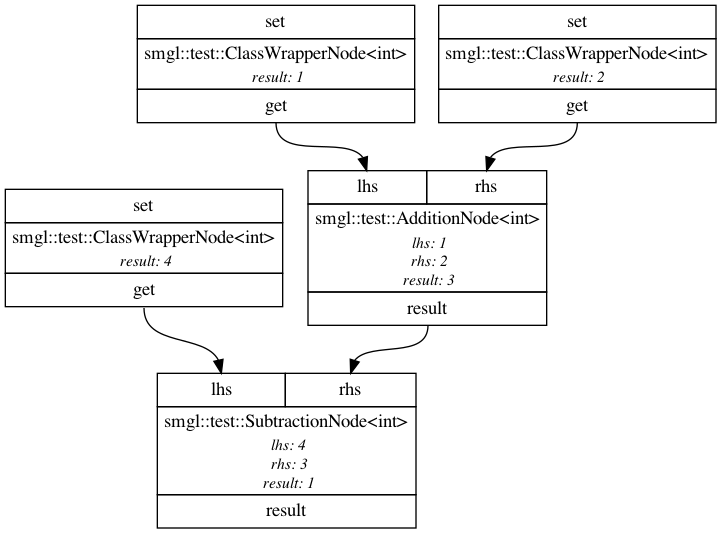
$ dot -Tpng -o graphviz.png graph.gv

Example visualization

Related Projects

This library is not meant for everyone. Its primary purpose is for building workflows that are instrumented with metadata, but there are many other use cases for dataflow libraries. If smgl doesn't fit your needs, perhaps on of these libraries will: